
You don’t need to be a composer to recognize the moment: a melody outline in your mind, a mood you can describe in one sentence, and a deadline that doesn’t care whether you own a studio. In those situations, an AI Song Generator can be less of a “magic button” and more of a practical bridge—something that helps you move from concept to a usable draft quickly, then iterate with intent. That’s the frame I used when testing AISong: not to replace musicianship, but to shorten the distance between an idea and audio you can actually publish, prototype, or build on.
The Real Bottleneck Isn’t Creativity—It’s Translation
Most creators I meet (and most projects I’ve shipped) don’t fail because of a lack of ideas. They fail because ideas are hard to translate into production-ready form. Typical constraints look like this:
- You need a cue that matches a very specific emotional arc.
- You need licensing terms that feel clear enough to use without anxiety.
- You need speed, because the music is one piece inside a larger pipeline.
- You need the output to be “good enough to ship” even if it isn’t “album perfect.”
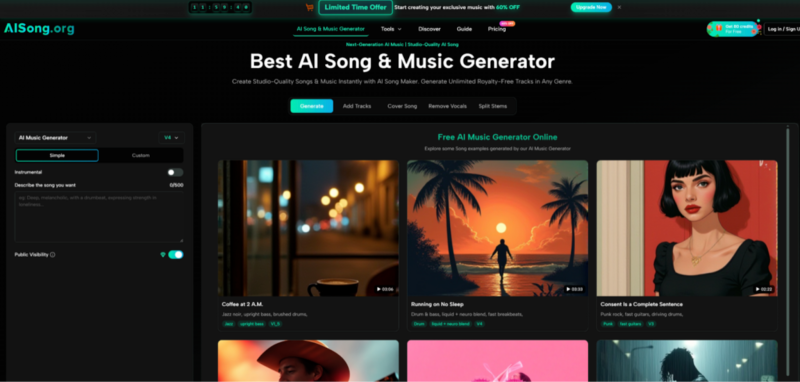
AI Music Generator is positioned around that translation problem: you describe the outcome, it generates a track, and you use the best result as a draft you can refine.
How AISong Operates: The Two-Lane Workflow
AISong describes two primary creation modes, and in practice they really do feel like two different workflows.
Simple Mode: Fast Drafting with Minimal Friction
Simple Mode is designed for speed and low decision fatigue. You provide a text description—genre, vibe, instrumentation cues—and the system fills in the gaps. When I used Simple Mode as a first pass, it behaved like a sketchpad: it gets you something concrete quickly, which is valuable even when the first output isn’t the final direction.
When Simple Mode makes sense
- You’re exploring ideas and want variety.
- You don’t want to author lyrics or structure line-by-line.
- You want quick “this is the vibe” drafts to choose from.
Custom Mode: More Control, Fewer Surprises
Custom Mode is the lane for creators who already know what they want. You can supply lyrics, define style more precisely, and set more explicit direction. In my tests, Custom Mode was most useful when I had a clear target and wanted to reduce randomness—especially around phrasing, mood stability, and overall arrangement shape.
When Custom Mode makes sense
- You have existing lyrics or a brand voice to maintain.
- You want tighter genre boundaries and fewer “left turns.”
- You plan to iterate systematically (prompt → output → prompt revisions).

Instrumental Mode: When You Want Music, Not Vocals
AISong includes an instrumental option, which is relevant if you’re building background tracks for video, podcasts, or game prototypes. Practically, instrumental generation often reduces the risk of vocal artifacts and keeps the result more consistently usable across different projects.
Model Versions: Treat Them Like Capability Tiers, Not Decoration
AISong publicly differentiates model versions (for example: duration limits, prompt capacity, and which tiers can access which models). In use, the model choice matters because it changes what kinds of prompts are worth writing:
- Shorter prompt limits reward concise, high-signal instructions.
- Larger prompt budgets let you describe structure and transitions more explicitly.
- Higher tiers tend to be positioned around longer outputs and deeper control.
I approach this the same way I approach camera bodies or microphones: you don’t always need the top tier, but the tier influences consistency and the range of “creative intent” you can reliably express.
A Practical Workflow That Produces Better Results (Without Overthinking)
If you want a realistic evaluation, here’s a AI Song Maker workflow that avoids both extremes—neither blind trust nor endless tweaking:
Step 1: Write a prompt with three anchors
- Mood (e.g., “hopeful, warm, late-night”)
- Genre (e.g., “indie pop, lo-fi, cinematic ambient”)
- Signature instrument or texture (e.g., “piano motif, nylon guitar, dusty vinyl noise”)
Step 2: Generate multiple takes on purpose
In my experience, running 3–5 variations is a normal part of getting something you’d actually keep. You’re not “failing” by regenerating; you’re sampling options.
Step 3: Add constraints only after you hear a direction
Once a take is close, tighten the prompt:
- “Less reverb, more upfront drums”
- “Simpler hi-hats, stronger bass groove”
- “Shorter intro, earlier hook energy”
Step 4: Export for the job, not for ego
- MP3 is usually enough for testing and publishing to many content channels.
- WAV is more useful if you plan to mix externally or want cleaner processing headroom.
What AISong Enables: The “Before vs After” Bridge
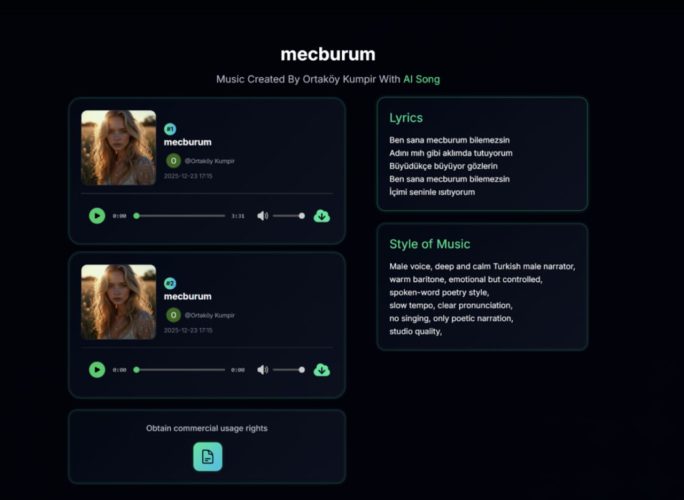
This is where AISong feels different from a static music library.
Before
- You search for something close, then compromise.
- You find a track you like, but it doesn’t match the moment.
- You keep scrolling because everything is “almost right.”
After
- You generate drafts that already reflect your narrative intent.
- You keep the best and iterate on what’s missing.
- You move faster because you’re editing direction, not hunting for it.
That “edit direction” dynamic is the biggest practical shift I felt.
Comparison Table: Why the Tradeoffs Matter
| Comparison Point | AISong | Stock Music Library | DIY DAW Production | Generic Text-to-Music Tool |
| Time to first draft | Minutes, multiple variations | Fast search, but limited to existing tracks | Often slow (composition + mix) | Minutes, quality can vary |
| Creative specificity | Prompt-driven; Simple + Custom modes | Limited to what exists | Highest control | Varies by tool |
| Iteration loop | High (generate → listen → adjust) | Medium (search fatigue) | Medium to low (manual labor) | High, sometimes inconsistent |
| Export practicality | MP3; WAV typically tied to plans | Usually MP3/WAV depending on vendor | Any format you render | Depends on provider |
| Workflow extras | Often includes creator-centric utilities (tier-dependent) | Rare | Possible with plugins, extra time | Sometimes included, not always robust |
| Licensing confidence | Positioned as royalty-free for many uses | Usually clear but can be restrictive | You own what you create | Often unclear, varies widely |
This isn’t a claim that AISong “wins” every category. It’s a way to make the choice honest: AISong is strongest when you value speed, iteration, and intent-driven drafts more than absolute determinism.
Limitations (Because Real Work Is Messier Than Demos)
A more credible evaluation includes what didn’t feel perfect.
Outputs depend on prompt quality
Two prompts that mean the same thing to you can produce meaningfully different results. Expect to learn what phrasing the system responds to best.
Sometimes you’ll need multiple generations
Even when results are strong, the “exact match” often takes a few attempts. Treat regeneration as part of the workflow, not as an exception.
Vocals can be the most variable element
When vocals are involved, intelligibility and naturalness can fluctuate. If your use case is sensitive (brand voice, clarity, multilingual lyrics), budget more iterations.
Commercial usage still deserves due diligence
AISong’s positioning emphasizes broad usability, but if you’re releasing high-stakes commercial work, it’s reasonable to keep a record of the plan you used and the terms that applied at the time. If you want a neutral, non-marketing overview of the broader policy discussion around AI and copyright, the U.S. Copyright Office’s recent reporting on AI training and related issues is a useful starting point.
Who This Fits Best (and Who Should Look Elsewhere)
AISong is a strong fit if
- You publish content regularly and need music that’s “on theme” quickly.
- You want drafts you can iterate on rather than tracks you must accept as-is.
- You value practical exports and an efficient idea-to-audio loop.
You may want alternatives if
- You need deterministic control over every bar, layer, and mix decision.
- You require enterprise-grade provenance for every output.
- You prefer fully offline workflows with zero cloud dependence.
A Grounded Way to Try It
If you want to evaluate AISong without guessing, pick one real project—an intro sting, a looping background track, a short cinematic cue—and run a controlled test:
- Generate 5 drafts from the same prompt.
- Tighten the prompt based on what you heard.
- Repeat once.
- Compare the best result against your current approach (stock library, DAW, or another tool).
If the time-to-usable-audio drops without adding new headaches, AISong has earned a place in your workflow. If not, you’ve still learned something valuable: what kind of control your projects actually require.