

Every Enterprise File Sync and Share (EFSS) demo looks the same. A folder syncs. A link gets shared. Someone comments on a document. Twelve minutes in, every vendor has proved they can do the thing that stopped being a differentiator around 2015.
What actually separates enterprise file sync and share solutions is everything the demo skips: whether an administrator can force every external link to expire, whether a departing contractor’s access disappears the moment their directory account is disabled, whether the audit log will survive a regulator’s questions, and whether the platform quietly refuses the 400 GB file your post-production team needs to send to a partner in another region. That last failure is where collaboration software and purpose-built Enterprise File Transfer part company — and it is the gap most shortlists discover only after the contract is signed.
Those failures are what push employees to personal Dropbox and consumer WeTransfer accounts — and Netskope’s Cloud and Threat Report 2026 found that roughly 31% of users in a typical organization upload data to personal cloud apps every month, with personal app instances involved in 60% of insider threat incidents. Shadow IT is not a discipline problem. It is a product-gap problem.
This comparison evaluates five platforms — Box, Egnyte, ShareFile, OneDrive for Business, and Raysync — against the criteria that decide whether IT keeps control: sync behaviour, sharing controls, permissions, link expiry and download restrictions, identity integration, audit and compliance, versioning, large-file handling, deployment options, and how each one charges.
1. What is Enterprise File Sync and Share?
Enterprise file sync and share (EFSS) is a category of software that lets an organization store files centrally, synchronize them to user devices, share them internally and externally through controlled links, and enforce access policy, retention, and audit logging across all of it from one administrative console.
The category exists because two things happened at once. Employees got used to consumer sync tools, and IT lost visibility into where corporate documents actually lived. EFSS was the answer: give people the sync-and-share experience they already understood, but wrap it in identity integration, permission inheritance, retention policy, and an audit trail.
A modern EFSS platform is usually assembled from six moving parts:
- A central repository — cloud, on-premises, or a hybrid of both.
- Sync clients — desktop agents that mirror or stream folders to Windows and macOS endpoints, plus mobile apps.
- A sharing layer — links and invitations with permissions, passwords, and expiry.
- A permission model — folder-level roles, inherited or explicitly overridden, tied to directory groups.
- A governance layer — retention schedules, legal hold, data-loss prevention, classification, and immutable logs.
- An identity boundary — SAML/OIDC single sign-on, SCIM provisioning, conditional access, and device trust.
Raysync approaches this from the transfer side rather than the document-management side: its EFSS solution pairs a browser-based file portal and scheduled directory sync with the acceleration engine underneath, which is a meaningfully different design centre from a platform built around collaborative editing.
What EFSS is not: a backup product, a records management system, or a content management system — although mature EFSS platforms increasingly borrow features from all three.
2. Enterprise File Sync and Share vs Enterprise File Transfer
These categories are frequently conflated on vendor comparison pages, and the confusion costs money.
EFSS optimizes for the file at rest. Its unit of work is a document that many people need to see, edit, and version over weeks or months. Its success metric is whether the right person has the right access to the right version.
Enterprise file transfer optimizes for the file in motion. Its unit of work is a payload — often hundreds of gigabytes or several terabytes — that has to get from A to B, intact, within a delivery window. Its success metric is throughput and completion, not collaboration.
That distinction becomes concrete the moment distance enters the picture. TCP-based transfer — which is what every mainstream EFSS sync client uses — degrades sharply under latency and loss. ESnet’s Fasterdata benchmarks document a 10G path at 90 ms round-trip time collapsing from 8.2 Gbps to 490 Mbps in the presence of just 0.0046% packet loss — “almost 17 times slower,” in ESnet’s own words. That is a defect small enough that most network monitoring would never flag it.
A collaboration platform is not built to solve that. A transfer platform is. Raysync’s core engine is a proprietary UDP-based protocol with intelligent UDP/TCP switching, checkpoint resume, and transfer verification, designed for exactly the long-haul, high-volume case that EFSS sync clients handle badly. If your genuine problem is moving very large datasets between regions on a schedule, you are shopping for Enterprise File Transfer, not for a collaboration tool with a bigger upload cap.
The overlap is real. Every platform in this comparison can move a large file, and Raysync’s platform includes portal-based sharing, sync tasks, and permissions. The difference is which job the architecture was designed around — and therefore which job it does gracefully at the ninety-fifth percentile rather than in the demo.
3. Enterprise File Sync and Share vs Managed File Transfer
The third category in this family is managed file transfer (MFT), and it differs from both EFSS and enterprise file transfer on a single axis: who initiates the transfer.
| Primary actor | Typical trigger | Typical payload | Governance emphasis | |
|---|---|---|---|---|
| EFSS | A person | Someone shares or edits a file | Documents, media, project folders | Access control, external sharing, versioning |
| Enterprise file transfer | A person or a system | A delivery deadline | Very large datasets, media masters | Throughput, integrity, resumability |
| MFT | A system | A schedule, a directory watch, or an event | Batch files, EDI, exports, backups | Automation reliability, non-repudiation, audit |
MFT is what you deploy when a nightly job must push 4,000 claims files to a clearinghouse at 02:00, retry on failure, verify checksums, notify an operations queue, and produce an audit record proving delivery. No human is in that loop, and none should be.
EFSS platforms are poor substitutes for this. Their automation surfaces are typically thin — a sync folder and a webhook — and their audit models are designed to answer “who opened this document?” rather than “did job 4471 complete, and what was the hash of the payload?” Raysync’s Managed File Transfer (MFT) capability sits on the automation side of that line, with schedule-based and directory-watch triggers, one-way and two-way sync, hash and rsync verification, email notification, and REST API, SDK, and CLI interfaces.
Where they overlap: all three categories need encryption, identity integration, and audit logging, and several vendors now sell across two or three of them. What you should resist is letting a vendor’s breadth talk you out of naming your primary problem. Buy for the primary job; treat the adjacent capability as a bonus, not as a substitute for a purpose-built tool.
4. Key evaluation criteria
Use these ten criteria to build a scorecard before you take a single demo. The order reflects how often each one actually kills a deployment.
1. File synchronization. Does the client stream files on demand or mirror them fully to disk? On-demand streaming keeps endpoint storage sane; full mirroring keeps offline work possible. Ask about selective sync, conflict resolution behaviour, and what happens when two people edit offline.
2. Internal and external sharing. Can users share with unauthenticated external recipients at all, and can that be restricted by directory allow-list? Check whether external recipients consume a licence.
3. Access controls and permissions. Folder-level roles, inheritance and override behaviour, group mapping from your directory, and whether a permission change propagates immediately or on the next sync cycle.
4. Link expiry and download restrictions. Per-link expiry and password protection are standard across all five platforms. The question that separates them is whether an administrator can enforce a maximum so a user cannot create a link that never expires — and on which tier that control unlocks. Also check view-only and download-blocked link types, download-count caps, and watermarking if you handle pre-release media.
5. Identity and SSO integration. SAML or OIDC SSO, SCIM provisioning and de-provisioning, conditional access, and device trust. De-provisioning is the one people forget; it is also the one that shows up in audit findings.
6. Audit logs and compliance. Retention period for logs, export to SIEM, immutability, and the specific certifications you need — SOC 2 Type II, ISO 27001, HIPAA, FedRAMP, GxP, TPN for media.
7. Versioning and collaboration. Number of versions retained, restore path, and whether real-time co-authoring is native or delegated to Microsoft 365 or Google Workspace.
8. Large-file handling. Maximum single-file size, resume-on-failure behaviour, and throughput over a high-latency link. This is where most EFSS platforms quietly disappoint media, genomics, and engineering teams — and where an enterprise large file transfer capability, rather than a bigger upload cap, is what actually resolves the problem.
9. Deployment options. Cloud-only, hybrid with on-premises caching, or fully self-hosted with no cloud dependency. Data residency add-ons are not the same as on-premises deployment.
10. Administration and pricing model. Per-user seats, storage tiers, add-on modules, and minimum commitments. Model your three-year cost with realistic headcount growth and realistic data growth — they diverge.
5. Comparison table
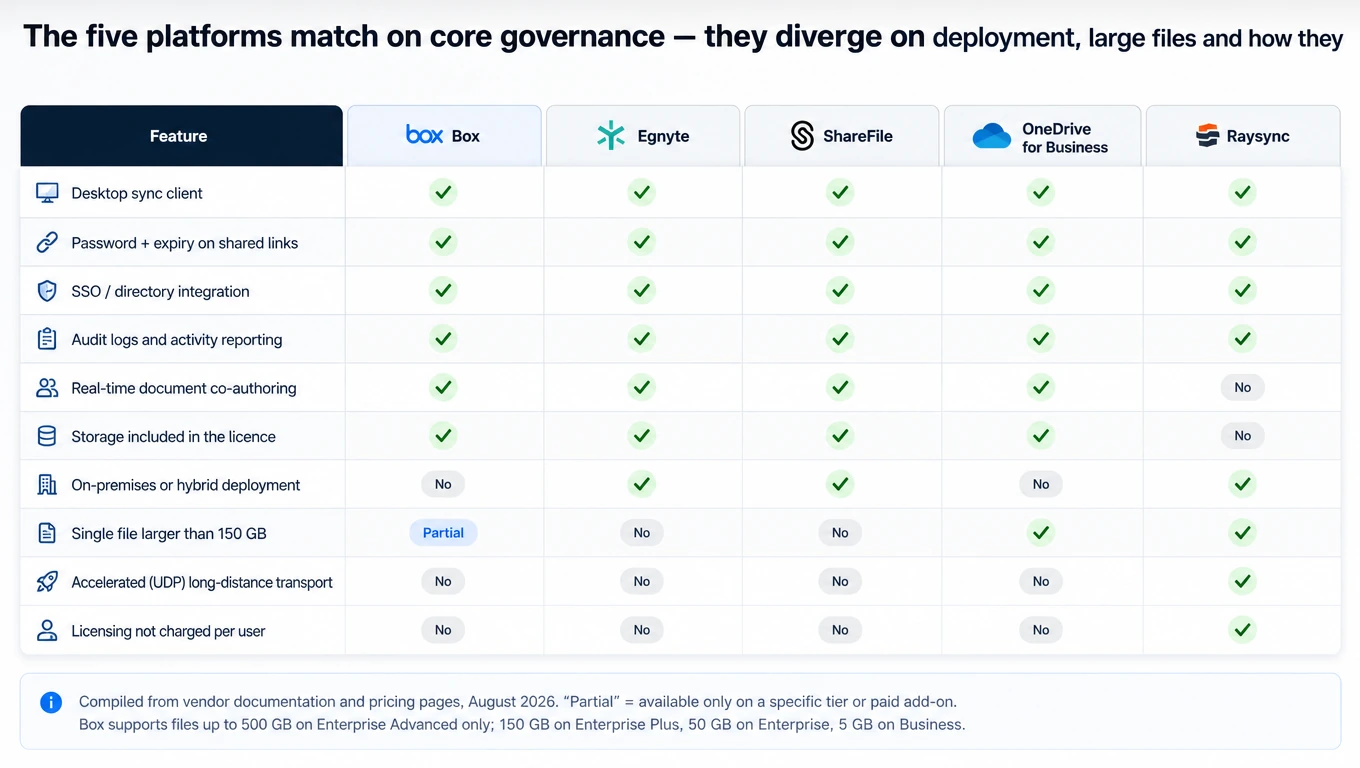
| Box | Egnyte | ShareFile | OneDrive for Business | Raysync | |
|---|---|---|---|---|---|
| Best known for | Content cloud + governance add-ons | Hybrid cloud file server | Client-facing portals in regulated professions | Microsoft 365-native storage | Accelerated large-file transfer with sharing |
| Sync | Box Drive (on-demand); Box Sync reaches end of life December 2026 | Desktop App with cloud file streaming | ShareFile Drive Mapper / desktop app | OneDrive sync client, Files On-Demand | Scheduled or real-time one-way and two-way sync tasks |
| External sharing | Link with 3 access levels; password + expiry | Public, password-protected, private, recipients-only | Client portals + secure links | Anyone / guests / existing guests / internal only | Encrypted links, no recipient account needed; file-request inbox |
| Link expiry & download limits | Expiry date, password, download restriction, view-only | Expiry by days/weeks/months or click count; admin default + maximum | Expiry and access controls per link | Admin-enforced max expiry on Anyone links; view-only option | Password, expiry date, and download-count limits per link |
| Identity / SSO | AD + SSO on all business tiers | AD + SSO/SAML on all tiers | AD + SSO on all plans | Microsoft Entra ID native; conditional access | AD, OpenLDAP, Okta, OneLogin, Google Workspace |
| Audit & compliance | SOC 2, ISO, FedRAMP, HIPAA, GxP, ITAR, PCI DSS, ISMAP; Box Governance add-on | HIPAA, FINRA, SOC 2, ISO/IEC 27001 compliant storage | HIPAA/FINRA/SEC eligible from Premium | Purview audit, DLP, sensitivity labels (tier-dependent) | ISO 27001, HIPAA, TPN certified, DPP member; transfer, operation and sharing logs |
| Versioning | 50 versions (Business) → unlimited (Enterprise Plus) | Configurable version history | Version history with retention settings | Up to 50,000 major versions per item | Transfer, sharing and preview history; document version retention not publicly documented |
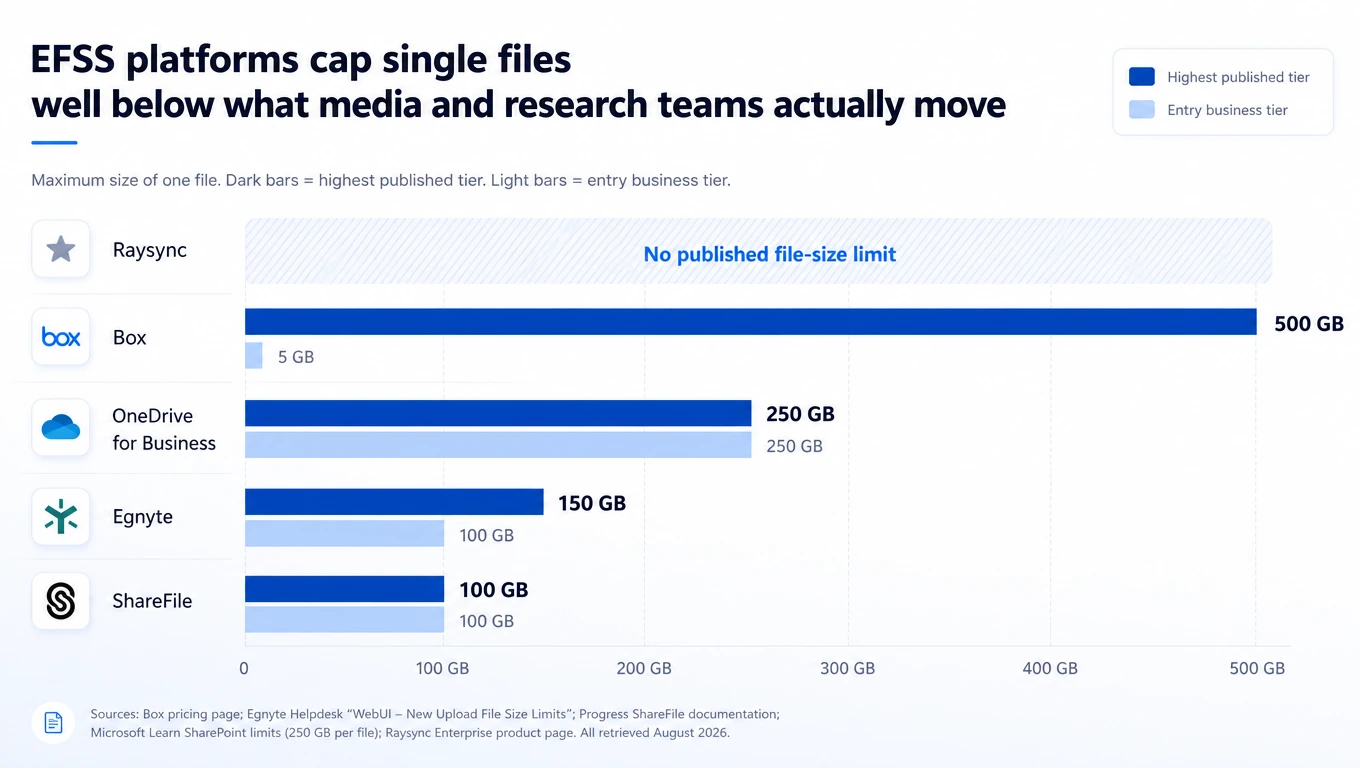
| Max single file | 5 GB → 500 GB by tier | 100 GB (Business) / 150 GB (Enterprise+) | 100 GB (10 GB on VDR) | 250 GB | No published limit |
| Deployment | Cloud only (Box Zones for residency in 10 regions) | Cloud + hybrid via Storage Sync appliance | Cloud + customer-managed storage zones | Cloud only | On-premises, cloud, or hybrid |
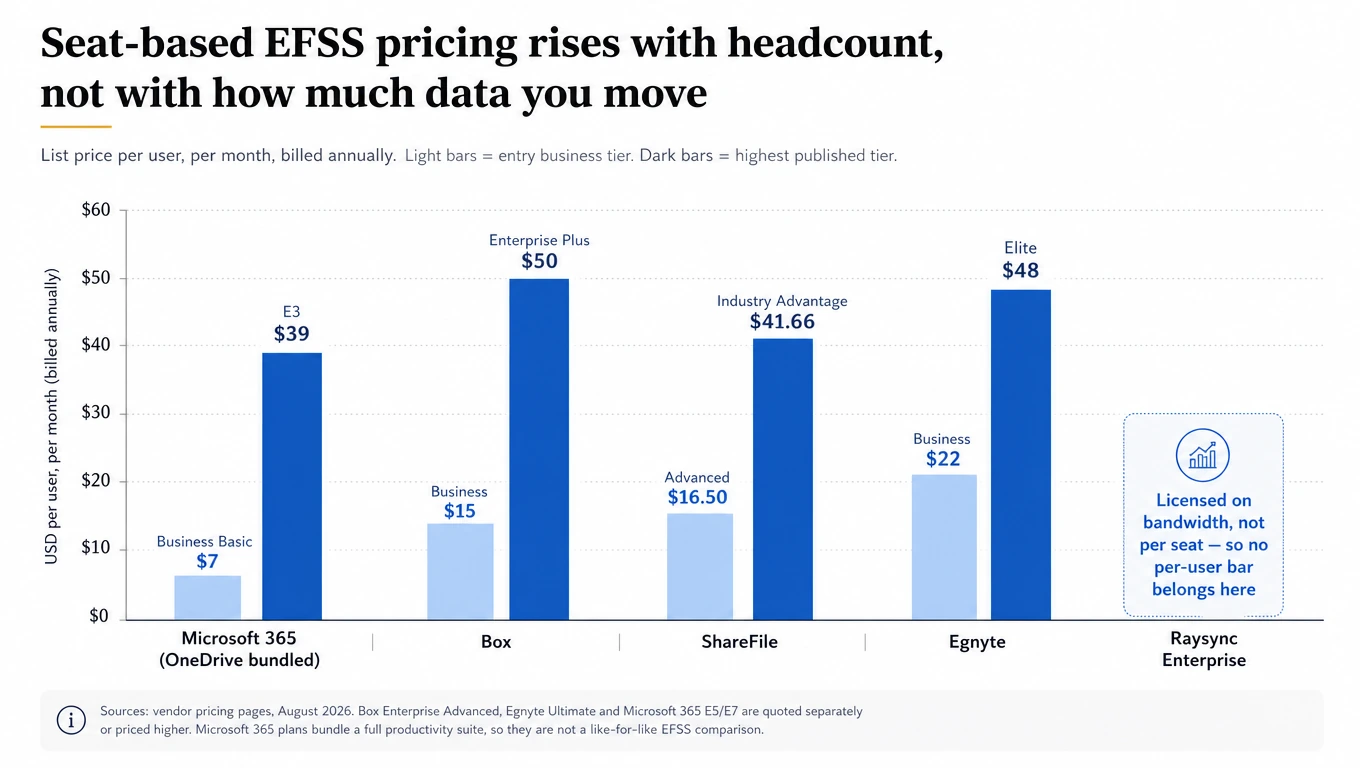
| Pricing model | Per user/month, min 3 users, unlimited storage | Per user/month, storage per user | Per user/month, min 3 users, 1 TB per licence | Bundled into Microsoft 365 suites | Bandwidth licence, unlimited users; custom quote |
| Published entry price | $15/user/mo (Business, annual) | $22/user/mo (Business, annual) | $16.50/user/mo (Advanced, annual) | $7/user/mo (M365 Business Basic) | Custom — free trial available |
6. Individual solution reviews
Raysync — transfer-first, with governed sharing on top
Raysync is the outlier in this comparison, and it should be evaluated as one. It is an international, Singapore-headquartered enterprise file transfer and data-acceleration vendor whose EFSS capability is built on top of a transfer engine rather than a document repository.
The engine is a proprietary UDP-based protocol with intelligent UDP/TCP switching and peer-to-peer transfer, which is what allows the platform to publish no file-size limit and full automatic resume at any size — the two constraints that make the other four platforms awkward for media, genomics, and engineering payloads. Security and governance are enterprise-grade: AES-256 in transit and at rest, TLS with support for custom TLS and client certificates, transfer verification, role-based access control, and transfer, operation, preview, upload, download, sync, and sharing logs that record user, IP address, timestamps, transfer size, average speed and status, searchable by user and file. It is TPN certified, a DPP member, and HIPAA and ISO 27001 certified — the TPN credential in particular matters to studios and post houses.
On the collaboration side it offers a browser file portal, controlled share links with password protection, expiry dates, and download limits, controlled file requests that give suppliers and customers an inbound route, a branded portal, and one-way or two-way sync tasks that run once, on an interval, daily, weekly, or in a real-time mode — Raysync’s own documentation is candid that real-time mode still rescans on a chosen interval, so changes do not propagate instantly. Identity integration covers Active Directory, OpenLDAP, Okta, OneLogin, and Google Workspace. REST API, SDK, and CLI interfaces cover automation, and the current offering includes AI-agent integration for natural-language remote file operations. Deployment can be on-premises, cloud, or hybrid.
Where it bites — and this is important for a balanced shortlist: Raysync connects to your own local, cloud, and NAS or network storage rather than bundling capacity into the licence, so storage is a separate line item you already own or must provision. It is also not a document-collaboration platform, and Raysync says so itself: the platform “governs files, access, links, previews, and history” while “teams keep their editing tools,” and it does not provide real-time collaborative document editing. There is no e-signature, no classification-based DLP module comparable to Box Shield, and no records-management suite. Document version history is not documented on its public product pages. If your requirement is “200 people co-editing proposals in a governed workspace,” Box, Egnyte, ShareFile, or OneDrive fit that shape better.
Choose Raysync if: your files are large, your teams are geographically distributed, your throughput over long-haul links is the bottleneck, and you need governed external sharing wrapped around that — not a replacement for Microsoft 365.
Box — the governance-heavy content cloud
Box has spent a decade repositioning from “cloud storage” to “content cloud,” and the governance depth shows. Its differentiator is not the core sharing experience — it is the surrounding module set: Box Shield for classification-driven DLP and threat detection, Box Governance for retention scheduling, legal hold and disposition, Box KeySafe for customer-managed encryption keys, Box Zones for data residency across ten regions, and Box Archive for lifecycle management. Compliance coverage is broad, spanning FedRAMP, HIPAA, GxP validation, ITAR, PCI DSS, and ISMAP, with AES 256-bit encryption at rest and in transit.
Pricing starts at $15 per user per month on Business (annual, minimum three users) with unlimited storage across every tier — unusual and genuinely valuable. Enterprise is $35 and Enterprise Plus $50; Enterprise Advanced is quote-only.
Where it bites: the file-size ceiling is tier-gated aggressively. Business caps a single upload at 5 GB, Business Plus at 15 GB, Enterprise at 50 GB, Enterprise Plus at 150 GB. The 500 GB figure that appears in comparison articles requires Enterprise Advanced. And the governance modules that make Box compelling are add-ons, so the headline seat price understates a governed deployment.
Choose Box if: your driver is content governance, classification, and regulated retention across a large document estate, and your files are documents rather than multi-hundred-gigabyte masters.
Egnyte — the hybrid cloud file server
Egnyte is the most credible option on this list for organizations that cannot fully leave on-premises storage. Storage Sync deploys as a virtual appliance on VMware ESX/ESXi 6.x–8.x or Hyper-V on Windows Server 2016/2019/2022, with AWS and Azure supported through its Public Cloud Connector. It caches locally, syncs bidirectionally with Egnyte Cloud, and lets a branch office work at LAN speed against a cloud-consistent namespace.
Its sharing controls are the most granular in this comparison. Link types run from public-no-password through public-password-protected to private-recipients-only, and expiry can be set by time or by number of clicks — a control the other four platforms do not expose. Administrators can set both a default and a maximum link expiration — though that control is available on Platform Enterprise Lite plans and above, not on Business.
Pricing is $22 per user per month on Business (100 GB per user, capped at 100 users), $39 on Enterprise Lite, and $48 on Elite, with Ultimate quoted. Ransomware detection begins at Enterprise Lite; customer-managed encryption keys require Ultimate.
Where it bites: it is the most expensive entry point here, the appliance adds operational overhead, and the 150 GB Web UI upload ceiling still rules out true large-media workflows.
Choose Egnyte if: you have real on-premises storage you must keep, distributed offices that need local performance, and an appetite for granular external-sharing policy.
ShareFile — client portals for regulated professions
Acquired by Progress Software from Cloud Software Group for $875 million in a deal that closed on 31 October 2024, ShareFile has narrowed its focus to the workflow around client-facing document exchange in accounting, legal, financial services, and healthcare. That focus is its strength. Premium ($26/user/month) adds e-signature covering up to 100,000 documents per month, automated workflows, client portals, and HIPAA/FINRA/SEC eligibility. Industry Advantage ($41.66) layers on pre-built accounting templates, bulk client onboarding, and a tax-practice UI. Advanced starts at $16.50, and a separate Virtual Data Room plan runs $69.30 per user with a five-licence minimum, adding dynamic watermarking, a centralized audit trail, and engagement analytics that show who viewed and downloaded which documents.
Storage is 1 TB per licence pooled into a 3 TB account, and customer-managed storage zones controllers let regulated firms keep content on their own infrastructure while using ShareFile’s control plane. Upload limit is 100 GB on standard plans, 10 GB on VDR.
Where it bites: if you are not one of ShareFile’s target professions, you pay for vertical features you will never use. General-purpose collaboration is not where it competes best.
Choose ShareFile if: your defining workflow is exchanging documents with external clients under professional compliance obligations, and e-signature plus request-and-return portals matter more than internal collaboration depth.
OneDrive for Business — the default that is changing shape
For any organization already standardized on Microsoft 365, OneDrive is the path of least resistance, and it is a genuinely strong one. Entra ID gives it the best identity story here — conditional access, device compliance, and risk-based policy come free with the tenancy. External sharing is controlled at four levels (Anyone / New and existing guests / Existing guests / Only people in your organization), Anyone-links can be forced to expire after an administrator-defined maximum number of days and restricted to view-only, and sharing can be limited to a domain allow-list of up to 5,000 entries. Versioning is effectively unbounded at up to 50,000 major versions per item, and the 250 GB single-file limit is the highest of the four commodity platforms.
The change buyers must plan around: Microsoft is retiring the standalone SharePoint Online Plan 1 and Plan 2 and OneDrive for Business Plan 1 and Plan 2 SKUs. Sales end 31 May 2026, contract renewals stop in January 2027, and the service continues until December 2029. Customers are directed to Microsoft 365 Business or E3/E5 suites — which for a storage-only use case means paying suite prices ($7/user/month for Business Basic, $39 for E3, $60 for E5) for capability you may not need.
Where else it bites: hard limits that surprise people — a 400-character total path length, a 20 GB cap on multi-file ZIP downloads, and no on-premises deployment option (SharePoint Server is a separate product and a separate project).
Choose OneDrive for Business if: you are a Microsoft 365 shop, your files are documents, and you want identity and DLP to live in one policy plane.
7. Best solution by use case
| Your situation | Strongest fit | Why |
|---|---|---|
| Microsoft 365 tenant, document-centric work | OneDrive for Business | Native identity, DLP and labels in one policy plane; no extra vendor. Budget for the suite, not the retiring standalone SKU. |
| Regulated document estate, retention and legal hold | Box | Governance, Shield, KeySafe and Archive cover classification, retention and key control in one ecosystem. |
| On-premises storage you cannot retire; distributed offices | Egnyte | Storage Sync appliance gives LAN-speed local access against a cloud-consistent namespace. |
| Client-facing exchange in accounting, legal or financial services | ShareFile | Portals, e-signature and vertical templates are the workflow, not an add-on. |
| Media, genomics, engineering — multi-hundred-GB files across regions | Raysync | No published file-size ceiling, UDP acceleration, TPN certification, on-premises option. |
| Automated system-to-system batch delivery | A dedicated MFT tier | None of the EFSS-first platforms are built for scheduled, non-repudiable machine workflows. |
| Mixed estate: collaboration and heavy data movement | Two platforms, deliberately | Pairing a collaboration EFSS with a transfer platform is usually cheaper and more reliable than forcing either to do both. |
8. How to reduce shadow IT
Shadow IT in file sharing is a predictable response to friction. People do not route a 30 GB video through a personal Google Drive because they want to; they do it because the sanctioned tool rejected the upload, throttled to 40 Mbps, or required the recipient to create an account.
The Netskope data quantifies the exposure: about 31% of users upload data to personal cloud apps each month, and 60% of insider threat incidents involve personal cloud app instances. Blocking alone does not fix this — it relocates it.
Five measures that actually reduce it:
1. Remove the capability gap that causes it. Audit your last quarter’s help-desk tickets and rejected uploads. If the sanctioned platform cannot handle the top three file sizes and destinations your business actually uses, no policy will hold. This is the single highest-leverage step and it is a procurement decision, not a security one.
2. Make the sanctioned path faster than the workaround. If a governed link is quicker than uploading to a personal account, behaviour changes without enforcement. Acceleration is a compliance control in disguise: an enterprise large file transfer capability inside the sanctioned platform removes the main reason people leave it.
3. Give external parties a front door. A branded, authenticated file-request inbox means partners send in to you rather than you chasing files across five consumer services. All five platforms document some version of this — ShareFile builds its whole proposition around client portals, and Raysync pairs controlled file requests with a branded portal.
4. Enforce policy at the link, not the person. Set an organization-wide maximum link lifetime, default new links to view-only, restrict anonymous links to an allow-listed domain set, and require passwords on anything leaving the tenancy. Coverage varies more than vendors imply: OneDrive documents all four (including a 5,000-entry domain allow-list), Egnyte offers default and maximum link expiration from Enterprise Lite upward, Box enforces default expiration by link type, and ShareFile lets admins set sharing defaults account-wide. Confirm each control against your own tenancy before you write the policy — and note that most organizations configure only one or two of the four they already own.
5. Monitor with a log people actually read. Export sharing and download events to your SIEM, and alert on the specific signals that precede loss: bulk downloads, first-time external domains, and link creation by departing employees. An audit log nobody queries is documentation, not a control.
9. Final recommendation
There is no single best platform here, and any comparison that names one is selling something.
If your files are documents and your organization already runs Microsoft 365, OneDrive for Business is the correct default — but plan your licensing around the standalone SKU retirement now, not in 2027.
If governance is your binding constraint — classification, retention, legal hold, key control — Box has the deepest module set, and you should price the add-ons into the business case from day one.
If you cannot leave on-premises storage, Egnyte’s Storage Sync is the most mature hybrid architecture on this list.
If your business is client document exchange under professional compliance rules, ShareFile’s portal-and-e-signature workflow will beat a general-purpose platform.
And if the files that break your current stack are the big ones — camera masters, sequencing runs, simulation output, regional dataset replication — the constraint is transport, not collaboration. That is where the Raysync Enterprise plan fits: a UDP-accelerated transfer engine with no published file-size limit, AES-256 encryption in transit and at rest, TLS with custom certificate support, checkpoint resume, transfer verification, scheduled and event-triggered one-way and two-way sync, role-based access control with detailed transfer and sharing logs, controlled share links with expiry and download limits, REST API, SDK and CLI automation, enterprise identity integration, and AI-agent integration for natural-language file operations — deployable on-premises, in the cloud, or hybrid, and licensed on bandwidth rather than per seat. It is TPN certified, a DPP member, and HIPAA and ISO 27001 certified.
The honest shortlisting advice is this: name your primary job before you take a demo. If it is collaboration, buy a collaboration platform. If it is moving data, buy a transfer platform. If it is genuinely both — and for many enterprises it is — the cheapest reliable answer is usually two purpose-built systems that integrate, not one that compromises on both.
Try it against your own environment. Raysync offers a free trial of the Enterprise plan through the Raysync website, so you can test acceleration, sync, and sharing controls against your own directory, your own storage, and your own network path before committing. Enterprise pricing is customized — request a quote alongside the trial.
Frequently asked questions
What does EFSS stand for?
EFSS stands for enterprise file sync and share. It describes software that synchronizes files across user devices and enables controlled internal and external sharing, with centralized administration, permissions, and audit logging that consumer file-sharing tools do not provide.
Is OneDrive for Business an EFSS platform?
Yes. OneDrive for Business provides sync clients, external sharing controls, permission management, versioning, and audit logging through Microsoft Purview, which places it squarely in the EFSS category. The main caveat for 2026 buyers is licensing: Microsoft stops selling the standalone OneDrive for Business Plan 1 and Plan 2 SKUs on 31 May 2026, so the capability is increasingly purchased as part of a Microsoft 365 suite.
What is the difference between EFSS and managed file transfer?
EFSS is person-initiated and optimized for collaboration on documents that many people access over time. Managed file transfer is system-initiated and optimized for automated, scheduled, auditable transfers between applications — nightly batch exports, EDI feeds, partner data drops. They share encryption and audit requirements but differ fundamentally in who starts the transfer and what “success” means.
Which enterprise file sync and share solution handles the largest files?
Among the platforms compared here, Raysync publishes no file-size limit, OneDrive for Business supports single files up to 250 GB, Box reaches 500 GB but only on its Enterprise Advanced tier, Egnyte caps at 150 GB on Enterprise tiers, and ShareFile at 100 GB. Note that a high size ceiling is not the same as high throughput — a 200 GB file that a platform accepts but transfers at 200 Mbps over a transcontinental link still misses the deadline.
Can EFSS replace an FTP server or a VPN?
For most human file exchange, yes — and it should, since both FTP and VPN-based file shares create broader access than the task requires. EFSS gives you per-file permissions, expiring links, and audit trails that neither provides. What EFSS does not replace is automated system-to-system transfer, which belongs in an MFT tier.
How do I stop employees from using personal Dropbox or Google Drive?
Close the capability gap first, then enforce. Confirm your sanctioned platform actually handles the file sizes, destinations, and external-recipient workflows people need; make the governed path faster than the workaround; provide an authenticated file-request inbox for inbound files; enforce organization-wide maximum link lifetimes and default view-only links; and monitor sharing events in your SIEM. Enforcement without capability just moves the behaviour somewhere less visible.
Does an EFSS platform make my organization HIPAA or GDPR compliant?
No. A platform can be HIPAA-eligible or support GDPR obligations — several here are certified against ISO 27001 and offer HIPAA-eligible configurations — but compliance depends on how you configure permissions, retention, data residency, and business associate agreements. Treat certifications as a prerequisite for the shortlist, not as evidence of compliance.