
A YouTube outro is your channel’s final handshake with viewers—a chance to reinforce your brand, suggest next steps, and leave a lasting impression. Yet many creators neglect this crucial element because designing a polished, animated outro traditionally requires video editing skills, templates, or outsourcing.
What if you could skip the complex software and create a professional outro in under five minutes?
That’s exactly what reference to video AI makes possible. By leveraging this emerging technology, you can transform a simple reference image or style guide into a fully animated, branded outro that looks like it took hours to produce.
What Is Reference to Video AI?
Traditional video generation requires detailed prompts and trial-and-error. Reference to video AI simplifies the process: you provide a visual reference—such as your logo, a screenshot of your channel’s color palette, or a sample style—and the AI analyzes that reference to generate a cohesive video. This ensures consistency across your intros, outros, and even social media teasers. The result is a professional-grade clip that feels uniquely yours, without the steep learning curve.
Why Your Channel Needs a Strong Outro
A well-designed outro does three things: it reinforces brand identity, encourages subscriptions, and promotes other videos or playlists. In short, it’s a retention and growth tool. However, many creators rely on static end screens or generic templates that fail to capture their unique style. With reference to video AI, you can create an outro that mirrors your channel’s existing aesthetic perfectly—without learning animation software.
How to Create an Outro in 5 Minutes
When it comes to speed and quality, Pollo AI is one of the most effective tools for this workflow. Pollo AI’s reference to video capabilities allow you to generate a custom outro in just a few steps.
Step 1: Gather Your Reference Material
Start with a reference image that captures your channel’s visual identity. This could be your logo, a screenshot from a previous video, or even a branded graphic you’ve used in thumbnails. The AI will use this as the stylistic foundation.
Step 2: Upload and Prompt
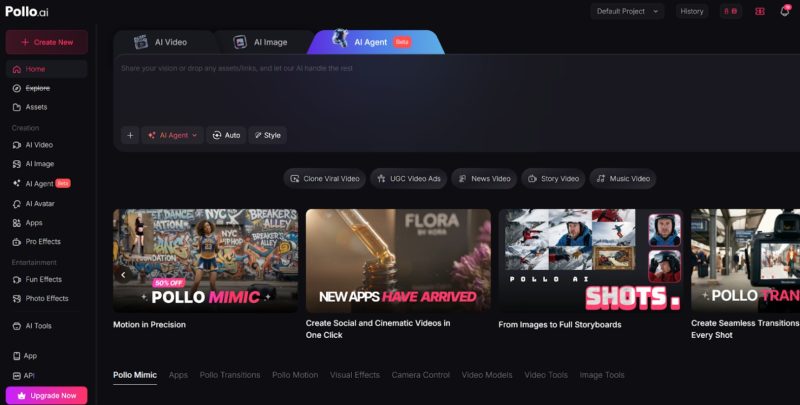
Go to the Pollo AI youtube outro maker and upload your reference image to Pollo AI. Then, provide a simple text prompt describing the motion you want. For example: “Logo zooms in gently with glowing particles,” or “Background animates with flowing waves and subscribe button appears.” Pollo AI’s engine interprets both the reference style and your motion instructions.
Step 3: Generate and Refine
Within seconds, Pollo AI produces a video that aligns with your reference. If you need adjustments, you can tweak the prompt and regenerate. The entire process typically takes less than five minutes.
Step 4: Add End Screen Elements
Once your animated outro is ready, import it into your video editor (or use YouTube’s built-in end screen tools) to overlay subscribe buttons and video links. The AI-generated clip serves as the eye-catching background that keeps viewers engaged.
Creative Ideas for Your AI-Generated Outro
Don’t limit yourself to simple logo animations. With reference to video AI, you can create outros that evolve with your content. For a travel vlogger, use a reference photo of a scenic location and animate it with subtle camera movement. For a tech reviewer, animate your logo with futuristic glows and circuit-like patterns. For a gaming channel, transform a game screenshot into a looping animated background featuring your channel name. The possibilities are endless, and because generation is so fast, you can create different versions for different video series or seasonal campaigns.
Tips for Maximum Impact
- Keep it short: Aim for outros under 10 seconds. Viewers have short attention spans.
- Use consistent colors: Reference your brand palette in the AI generation to reinforce identity.
- Add music: Pair your AI-generated video with royalty-free tracks for a complete package.
- Test variations: Generate a few versions and see which performs best with your audience.
Your YouTube outro doesn’t have to be an afterthought. With reference to video AI tools like Pollo AI, you can make YouTube outro animations that are professional, on-brand, and ready in under five minutes. By eliminating the complexity of traditional animation software, these tools empower creators to focus on what matters most: delivering great content. Start with a strong reference image, let the AI handle the motion, and watch your channel’s presentation take on a polished, consistent edge that keeps viewers coming back for more.