
Here is a truth most productivity software companies would rather you not think about: the PDF format was never supposed to be this complicated. Adobe invented it. Adobe monetized it. And for decades, Adobe charged accordingly. The good news is that the market finally caught up. The better news is that one of the strongest challengers on the field right now is a product called SwifDoo PDF, and it is worth your time to pay attention.
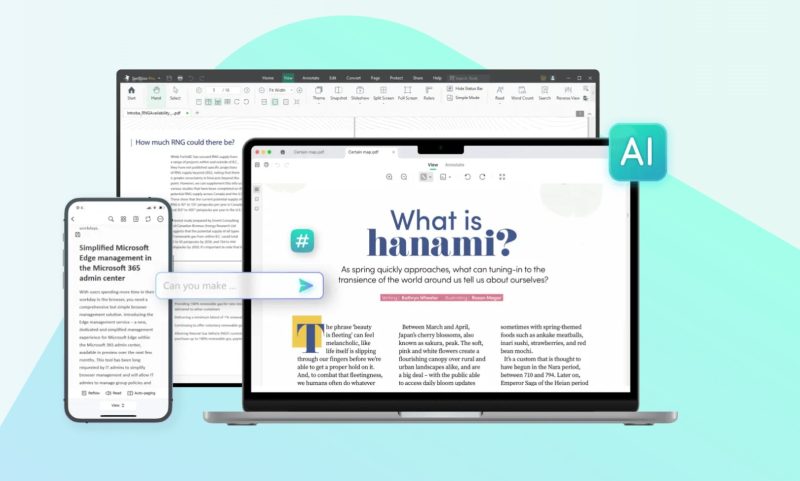
I spent several weeks putting SwifDoo PDF through its paces across Windows and mobile, evaluating it not just against the marketing copy, but against the actual day-to-day frustrations that make PDF management feel like an unnecessary tax on your working hours.
What I found was a tool that is thoughtfully designed, surprisingly capable, and refreshingly honest about what it is: a complete PDF solution built for people who want results without the enterprise price tag.
What Is SwifDoo PDF, Exactly?
SwifDoo PDF is an all-in-one PDF software suite available on Windows, Mac, iOS, and Android, with a web-based toolset that handles the most common conversion tasks without requiring a download. The company, SwifDoo Software, has built a product trusted by users in more than 160 countries and holds a 4.8-star rating across more than 10,000 user reviews. Publications including PCWorld, PC Mag, TechAdvisor, and CNET have all taken note.
The software covers the full PDF workflow: editing, converting, merging, compressing, annotating, signing, protecting, and now, AI-assisted document analysis. That last capability is where things get genuinely interesting.
The Feature Set: More Than You Would Expect
Editing That Actually Works
The core editing engine is solid. You can add, delete, and reformat text directly within any PDF, adjust font size, style, and color, and insert or replace images and hyperlinks. The interface draws heavily on the Microsoft Office model, which is a deliberate choice: the learning curve is essentially zero if you have ever used Word or Excel. For anyone who has wrestled with Adobe Acrobat’s counterintuitive panel layout, this is a genuine breath of fresh air.
There is also a find-and-replace function, text box insertion, and the ability to crop pages and edit backgrounds. Nothing here is buried in a submenu. The tools are where you expect them to be.
Conversion Without the Compromise
PDF conversion is where a lot of cheaper tools fall apart, mangling formatting and losing data in the process. SwifDoo PDF handles conversion in both directions across a wide range of formats, including Word, Excel, PowerPoint, JPG, PNG, TIFF, BMP, HTML, EPUB, and even CAD formats like DWG and DXF. That CAD support is notable. It is the kind of feature that signals the product is being built for professionals, not just casual users.
The company’s claim of preserving original formatting during conversion is, in my testing, largely accurate. Complex tables and multi-column layouts survive the round-trip better than most competing products at this price point.
OCR: Turning Scans Into Live Documents
The built-in OCR engine deserves special mention. Scanned PDFs are the silent nightmare of document management, arriving as image files that cannot be searched, edited, or copied from. SwifDoo PDF’s OCR converts those image-only files into fully searchable, editable documents. It handles recognition quickly and with solid accuracy, which makes it genuinely useful for anyone dealing with legacy document archives or contracts scanned from paper originals.
AI Integration: The Feature Worth Watching
SwifDoo AI is the product’s most forward-looking capability. It can summarize lengthy documents in seconds, translate PDF content into other languages, proofread and rewrite text, and respond to direct questions about a document’s content through a conversational chat interface. For researchers, lawyers, students, and executives dealing with dense documents, this is not a gimmick. It is a genuine workflow accelerator.
The translation feature works with selected text or entire documents, which makes it useful for international teams and anyone working across language barriers. The ability to chat with a PDF and ask it to explain obscure clauses or summarize key points is the kind of functionality that would have seemed futuristic just two years ago.
Security and Signatures
For document security, SwifDoo PDF offers two-level password protection that restricts viewing, copying, printing, and editing. Electronic signatures can be created via handwriting, typed text, or imported signature images, and are designed to be legally binding. In an era where paperless workflows are table stakes, the signature tools here are well-implemented and easy to use.
Why the Lightweight Design Matters
One of SwifDoo PDF’s least glamorous but most important selling points is its footprint. The application takes up only 30 MB of disk space. Compare that to Adobe Acrobat, which regularly demands well over 1 GB, and you start to understand the philosophical difference between the two products. SwifDoo PDF was built to open fast, run efficiently, and get out of the way. Files load quickly. The interface responds without lag. For users on older hardware or constrained storage, this is not a minor detail.
Cross-Platform and Cloud Ready
SwifDoo PDF runs across Windows, Mac, iOS, and Android, and the SwifDoo Cloud feature allows documents to be stored and accessed universally. For teams that work across devices or individuals who move between a desktop at the office and a phone on the go, this kind of continuity matters. The online toolset also handles the most common conversion tasks without requiring any software installation at all, which lowers the barrier to entry for occasional users.
The Competitive Landscape: Where SwifDoo PDF Wins
The PDF software market is not short on options. Adobe Acrobat sits at the expensive end. Foxit PDF Editor targets enterprise buyers. Smallpdf and ILovePDF operate online only. Where does SwifDoo PDF fit?
It wins on three dimensions:
- Price-to-feature ratio. The Pro tier delivers capabilities that cost multiples more with competing tools.
- Speed and efficiency. The 30 MB install and fast loading give it a responsiveness advantage that heavy enterprise tools simply cannot match.
- Breadth without bloat. The feature set is comprehensive without becoming overwhelming, which is harder to achieve than it sounds.
The CAD conversion support, OCR accuracy, and AI integration push SwifDoo PDF into territory that most of its price-tier competitors have not reached. That combination is a meaningful differentiator.
Who Should Be Using SwifDoo PDF?
Freelancers, small business owners, students, and professionals who handle PDFs regularly but have no interest in paying enterprise prices or dealing with enterprise-grade complexity. Engineers and architects who need CAD-to-PDF workflows. Researchers and legal professionals who can leverage the AI summary and chat features to process dense documents faster. International teams who need built-in translation capabilities.
In short: anyone who has ever looked at their Adobe subscription bill and thought there has to be a better option. There is.
Final Verdict
SwifDoo PDF is the rare software product that delivers on its premise without asterisks. It is fast, capable, well-designed, and priced in a way that makes the obvious incumbent look like a legacy habit rather than a rational choice. The AI features add a forward-looking dimension that will only become more valuable as the product matures. Whether you are managing contracts, processing research papers, converting design files, or just trying to edit a scanned document without losing your mind, SwifDoo PDF belongs on your shortlist.
You can download SwifDoo PDF for free and explore the full feature set at swifdoo.com. A Pro upgrade is available for those who want unlimited access to the full suite.